
Table of Contents
Download Fifa EA Sports FC 27 SP ISO file
As at today most high graphics football games require internet connection but one consistent offline game with updated transfer, kits and stadium is EA Sports FC 27 PSP. Some of these games are known for their big download sizes and their online nature many people find as a limitation, especially those lacking good phones and fast internet. This time around, I will be showing you how to get and play EA FC 2027.
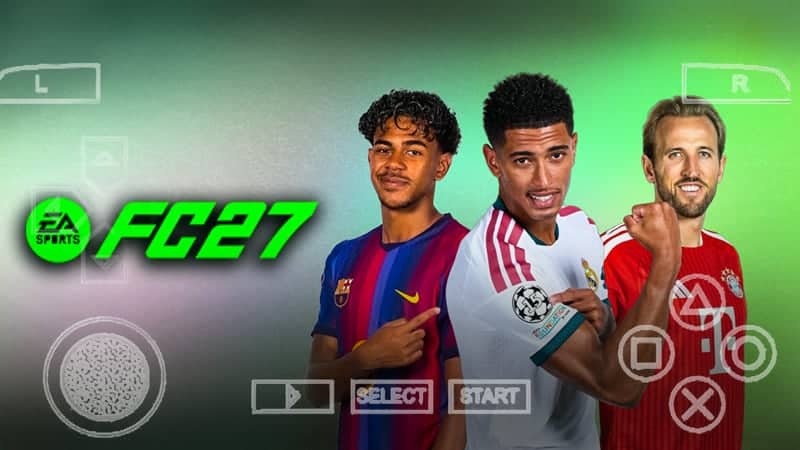
This EA Sports FC 27 PSP is fan made and you should understand that there are no official updates from the EA Sports itself om the PSP iso since support to the PSP has been discontinued few years back. However, all transfer update have been been implemented to reflcect updates of the real world for 2026/2027 season. This is due to the love we have for both the Playstation Portable and FIFA/EA Sports FC franchise.
You can play this game on your Android, iOS and even PC, a;; you have to do is to get the PPSSPP emulator from your respective store. This article will provide all information to ensure you can play this game on your device.
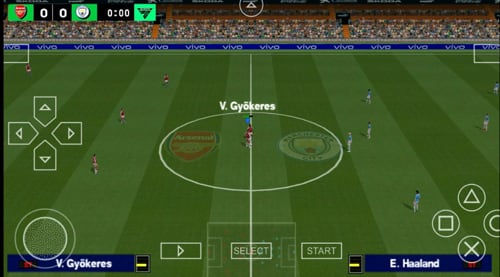
I have played and tested out the game quite extensively, my experience were quite amazing as I found the graphics very detailed. I was impressed by the realistic nature of the textures, shadows, and reflections on even my phone’s small screen, which really show off the game’s graphics to the fullest. Also, the game reflects the real world soccer players by having their latest transfer data in the new 2026/2027 season.
Key Features of FIFA EA Sports FC 27 PPSSPP
More updates will still be added in future but below are the ones we have noticed so far;
Visual Improvements: The graphics in FIFA 2027 is now better than in previous games as celebrations, player movements, response, tackling have received a major upgrade.
Updated Gamemodes And Transfers: If you are someone who follows real-word football closely, you must have realized that all player transfers are included in this version of the game. After all, there is absolutely no point in playing with outdated teams if you are following the football world news closely.
Performance Optimization: This is where I was more interested as performance is the key to excellent gaming (a friend told me that). The game runs smoothly on my budget Android device without draining the battery too quickly and I was able to easily get 2-3 hours of gameplay on a single charge.
Commentary is more lifelike now: The English commentary feels more natural and less repetitive. The commentators speak a lot more than before and new players name have been added to the system.
New Tournaments: They have added several new competitions that were not initially in the original release, giving you more ways to play and progress through the game.
Gameplay here
Download Information
Before you start downloading, make sure your device can handle it and below is what you will need:
- File Name: EA Sport FC 27
- Download format: Rar file (PSP ISO and game files)
- Last Update: October 2026
- Compressed download size: 1.7GB
- Platform: PSP/PPSSPP
- Developer: EA Sports
SEE ALSO: eFootball 2027 PSP games
Device Minimum Requirements
The below requirements are the minimum as I tried running it on an older device with 1GB RAM and it was practically unplayable due to constant lag and crashes.
- PSP emulator
- 2GB RAM
- 4GB Free storage space
- Quad-core processor
- Android v5.1 Lolipop
Important notice
Watch the video below if you do not understand how to install the game and see the gameplay above if you want to be sure of what you are downloading.
See below for the gameplay and Installation process
How to download and install EA Sport FC 27 ISO file on android
- Get the EA Sport FC 27 and required data files here
- Install the PPSSPP emulator and a zip extractor on your device.
- Extract the FIFA 27 PPSSPP zip file after your download is completed
- Open the DATA folder after extracting the file.
- Copy the PSP folder by going to your internal storage and paste to replace the original folder there
- Extract the game file as well and move it to the PSP game folder
- Exit to the home screen
- Launch the emulator app and go to “Find Games” to play EA Sport FC 27 psp.
If you would like to see how to change game’s Camera to any one of your choice, simply enter the game and adjust the the in-game camera. NO CAMERA PATCH NEEDED.
In case of a black screen problem, try changing the language in your PPSSPP app to Spanish. You can watch the installation tutorial video for visual guidance.
Importing Save Data and Texture Files
To ensure all latest transfer and textures are applied, please strictly follow the below steps to import save data and texture files successfully.
- Download the necessary save data and texture files from the link provided above
- Go to your download folder and locate the PSP folder.
- Move the PSP folder to the internal storage
- Launch EA FC 2027 PSP to confirm that the data was imported properly.
With these steps, you should be able to get the latest game updates without any challenges. However, if by chance you have any issues, refer to the troubleshooting section below or visit our YouTube channel for visual instructions.
Troubleshooting Tips (FAQs)
Here are answers to some commonly asked questions you might also have. If you face any download or installation issues, check these out.
Black Screen Problem: If you experirnce a black screen when you start the game, try to change your PPSSPP language settings to Spanish and the error should be fixed. If that doesn’t fix the problem, delete the whole folder and extract again.
Wrong Year Displaying: If you are getting 2019 or 2020,you most likely did not import the texture files correctly since the base game is actually from 2019 but the texture was modified to reflect the update for the 2027 version with updated players and kits. Simply follow the above instruction on how to import the save and texture to get the correct 2027 game.
Performance Issues: Try adjusting the graphics settings in PPSSPP application if the game lags. The default settings of the emulator might be too demanding for your device and adjusting it might just get you a better performance.



Ppsspp football game
FC fifa
I want 2027 efootball PSP ISO file
I want this game
Good one
Eu mesmo baixar
nataka gemu ra EA
This is game 🎮 for the best
Please send the file
What is the password to extract the ISO file?”
Game
So sweet like 🎂
I want e football 2027 iso file
Happy
Ea sport 27
Merci pour tou
Je vous en prie
I need the file
How can I use your site to download efootball 27 on my Redmi A3x
It,s straight forward, follow the article instructions and you should be fine
I love the game
There is no challenge about this game
Gostei dos jogos são muito práticos